The Situation
You get a call that feels urgent on purpose. A bank account is supposedly locked. A child is supposedly in trouble. A delivery, toll, benefit, card, or payment is supposedly about to create a bigger problem unless you act now.
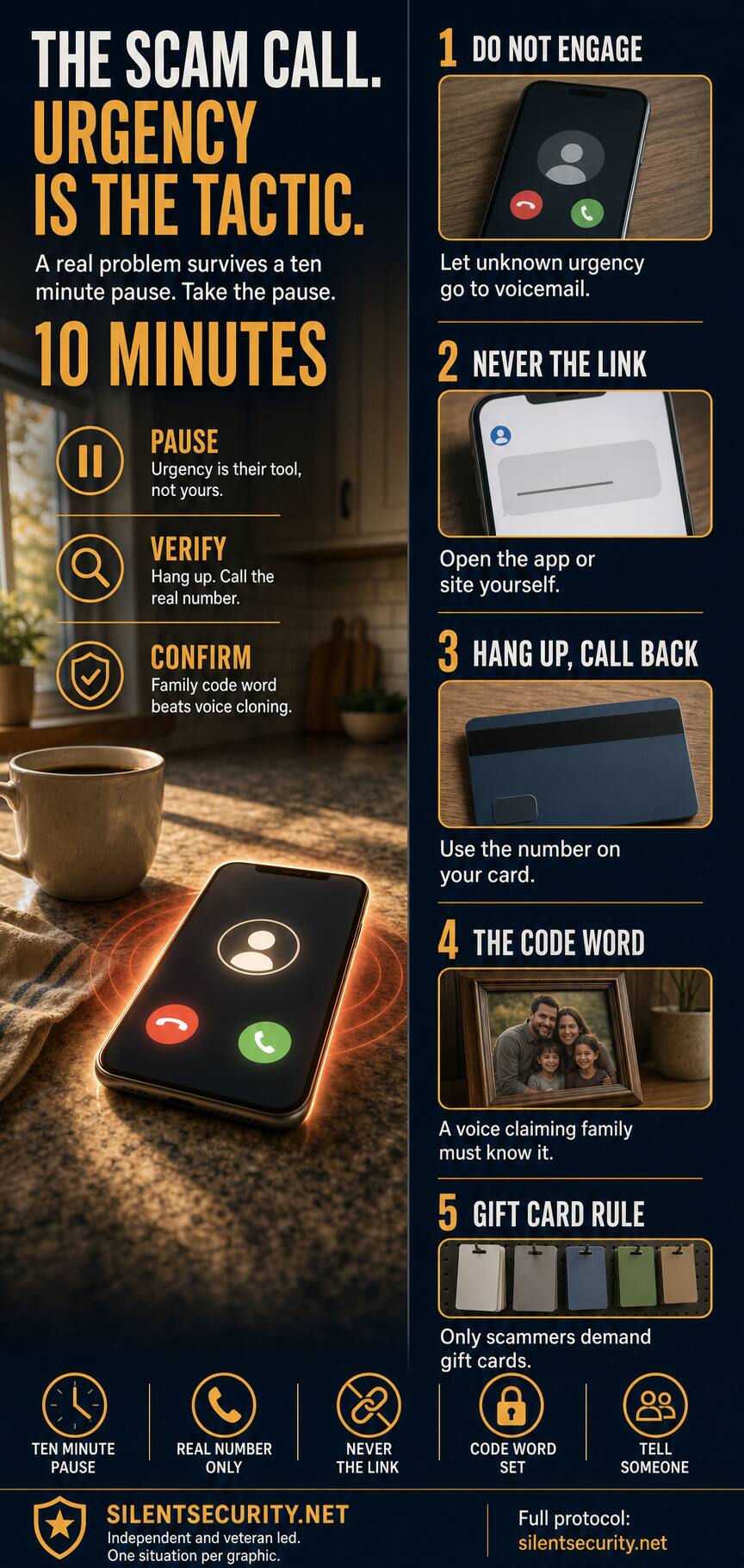
The call may sound professional. It may show a familiar name on caller ID. It may even use a voice that sounds like someone you know. The point is not to prove the call is fake while you are still on the line. The point is to stop the caller from controlling the next ten minutes.
The protocol is simple: pause, hang up, verify through a real channel, then tell someone if money or personal information was requested.
How the Scam Works
- They create a narrow window. The caller says the problem is happening right now. That pressure is designed to prevent normal thinking.
- They borrow authority. They claim to be a bank, government office, tech support desk, delivery company, police officer, employer, or family member.
- They isolate you. They tell you not to hang up, not to call anyone else, not to log into the app, or not to discuss it with family.
- They move you to action. The action might be a link, a payment app, a wire transfer, a gift card, a remote support app, a verification code, or personal information.
- They punish hesitation. When you slow down, they raise the pressure. That reaction is the tell.
The defense is not a script debate with the caller. The defense is a break in contact.
The Ten Minute Rule
Use this line out loud:
I do not handle urgent financial or account issues on incoming calls. I am going to hang up and verify through the real number.
Then hang up. Do not press a number. Do not stay on the line while they explain. Do not call back from the caller ID. Open the official app, use the number printed on your card, use a bookmarked website, or call a known family contact directly.
If the problem is real, it will still exist ten minutes from now. If it is a scam, the pause breaks the tactic.
Self Test: Would You Pass?
Answer honestly. If any answer is "no," fix that one habit first.
- Do I let unknown urgent calls go to voicemail?
- Do I know the real phone number for my bank, card issuer, and mobile carrier?
- Would I refuse to click a link in an unexpected text, even if it looks official?
- Does my family have a code word for emergency calls?
- Would I stop immediately if someone demanded gift cards, crypto, wire transfer, or payment apps?
- Would I tell one trusted person before moving money under pressure?
The Family Code Word
Voice cloning changes the family emergency scam. The old advice was "listen for whether it sounds like them." That is no longer enough. The better rule is a code word.
Pick one phrase your household can remember but strangers would not guess. Do not use a pet name, school name, birthday, address, sports team, or anything visible on social media. If a caller claims to be family and needs money now, ask for the code word. If they do not know it, hang up and call the person or another family member directly.
This pairs with the guidance in AI voice cloning scams and the family conversation model in how to talk to elderly parents about scams.
What to Buy, If Anything
Amazon Associates disclosure: As an Amazon Associate, Silent Security earns from qualifying purchases. Hardware categories below are intentionally unlinked until specific products are verified in the ASIN registry.
Basic
Use the free controls first: phone carrier spam filtering, built-in caller ID warnings, voicemail screening, account alerts, and a family code word. Save real bank and card numbers in your contacts from the official card or app, not from a search result.
Advanced
If scam calls hit a landline or a senior household, compare call-blocking phones for seniors, landline call blockers, and large-button phones with call blocking. Look for simple controls, readable screens, whitelist mode, and easy access to trusted contacts. Keep these as category checks until specific products are verified in the ASIN registry.
Professional
If personal information has already been exposed, or if a household needs monitoring and recovery support, consider Aura identity protection. Treat it as a monitoring and response layer, not a replacement for credit freezes, strong passwords, multi-factor authentication, and the ten minute pause.
If You Already Engaged
If you clicked a link, gave a code, shared a password, sent money, bought gift cards, or installed remote support software, do not hide it. Speed matters.
- Call the bank, card issuer, gift card company, or payment service using a real number.
- Change the affected password from a clean device.
- Turn on multi-factor authentication where available.
- Report fraud at ReportFraud.ftc.gov.
- If identity information was exposed, use IdentityTheft.gov for a recovery plan.
- Tell one trusted person what happened so you are not handling the cleanup alone.
Make It a Household Rule
Do not wait for the next call to invent the rule. Put this in writing and send it to the people who matter:
No money, codes, links, remote access, gift cards, crypto, or wire transfers from an incoming call. We pause ten minutes, hang up, verify through the real number, and tell someone.
For a longer scam-call walkthrough, use the confirmed guide at Scam Response Guide. For the physical security side of becoming a harder target at home, use the Home Hardening Guide.
Source Notes
- FTC guidance says not to click links in unexpected messages and to contact the company through a phone number or website you know is real: FTC, unexpected text scam guidance.
- FTC guidance says only scammers demand gift cards and the numbers from the back of the card: FTC, avoiding and reporting gift card scams.
- CISA guidance explains that multi-factor authentication makes accounts more secure than passwords alone: CISA, More than a Password.
- USAGov guidance states that placing or lifting a credit freeze is free through the three major credit reporting agencies: USAGov, credit freeze guidance.